Although not officially, but now you can use script editor in SharePoint modern pages using SharePoint Framework web part. Here is the GitHub link for the same.
Also, there are host of various other SharePoint Framework samples you can use.
Enjoy scripting...
Saturday, April 13, 2019


Sunday, March 26, 2017
Disable mobile view redirection in SharePoint 2010
When SharePoint 2010 site is accessed in mobile devices, it shows stripped down version of the site with limited features for mobile devices. SharePoint redirects to a special page responsible for rendering the mobile view. This may be helpful if you want to keep minimalist approach for mobile devices.
However; most of the time you want to disable this behavior as the design itself may be responsive thus not requiring the mobile view redirection.
There are 3 options available to do this:
Disable MobilityRedirect Feature in SharePoint using power shell.
Disable-SPFeature -Identity MobilityRedirect -Url http://yoursite
It appeared to be the best option, without requiring you to change the lines in Web.Config. But it did not work for me.
Change compat.browser
Navigate to "C:\inetpub\wwwroot\wss\VirtualDirectories\[port-of-your-site]\App_Browsers\compat.browser" and change "isMobileDevice" property to false for each user agent present.
This is the least preferred option for me as it requires to change values at multiple places and this may get overwritten with new patches.
Change web.config file of the web application
Open the web.config file for the web application and navigate to the "".
Add the following lines of code:
<browserCaps>
<result type="System.Web.Mobile.MobileCapabilities, System.Web.Mobile, Version=2.0.0.0, Culture=neutral, PublicKeyToken=b03f5f7f11d50a3a"/>
<filter>isMobileDevice=false</filter>
</browserCaps>
I feel this is the most fail safe way. This does not have risk of values being overwritten due to new patches to the server.
More information on this can also be found at perficient blog
However; most of the time you want to disable this behavior as the design itself may be responsive thus not requiring the mobile view redirection.
There are 3 options available to do this:
Disable MobilityRedirect Feature in SharePoint using power shell.
Disable-SPFeature -Identity MobilityRedirect -Url http://yoursite
It appeared to be the best option, without requiring you to change the lines in Web.Config. But it did not work for me.
Change compat.browser
Navigate to "C:\inetpub\wwwroot\wss\VirtualDirectories\[port-of-your-site]\App_Browsers\compat.browser" and change "isMobileDevice" property to false for each user agent present.
This is the least preferred option for me as it requires to change values at multiple places and this may get overwritten with new patches.
Change web.config file of the web application
Open the web.config file for the web application and navigate to the "
Add the following lines of code:
<browserCaps>
<result type="System.Web.Mobile.MobileCapabilities, System.Web.Mobile, Version=2.0.0.0, Culture=neutral, PublicKeyToken=b03f5f7f11d50a3a"/>
<filter>isMobileDevice=false</filter>
</browserCaps>
I feel this is the most fail safe way. This does not have risk of values being overwritten due to new patches to the server.
More information on this can also be found at perficient blog
Sunday, March 12, 2017
SharePoint Server 2016 Resources
Microsoft TechNet link for SharePoint 2016 Resources for IT Pros.
https://technet.microsoft.com/en-us/library/cc303422(v=office.16).aspx
There are lots technical resource for SharePoint 2016 related to Architecture, Planning, Implementation and lots more.
https://technet.microsoft.com/en-us/library/cc303422(v=office.16).aspx
There are lots technical resource for SharePoint 2016 related to Architecture, Planning, Implementation and lots more.
Friday, March 10, 2017
Add and Customize Pages Permission Denied to Site Collection Administrator
In SharePoint online, you may come across strange access denied issue working with SharePoint Designer, Master pages, style libraries and Page Layout not just for users with Designer, Full Control access but even for Site Collection Administrator.
On verifying the permission of the user, you will see explicit Deny permission for "Add and Customize Pages" is applied. See the following screenshot for the Deny permission.

The Deny permission cannot be removed using the standard permission management procedure in SharePoint.
Also, you will find this issue with the root site collection in SharePoint online.
To get rid of the issue, perform the steps outline by Microsoft in the article - Turn scripting capabilities on or off
The scripting needs to be allowed SharePoint Admin Center and if you need it on immediate basis you must use power shell command.
NOTE: If you miss to enable scripting in SharePoint Admin Center, the change performed by the power shell command will be reverted after 24 hours.
Allow Custom Script in SharePoint Admin Center
1. Go to SharePoint Admin Center


On verifying the permission of the user, you will see explicit Deny permission for "Add and Customize Pages" is applied. See the following screenshot for the Deny permission.
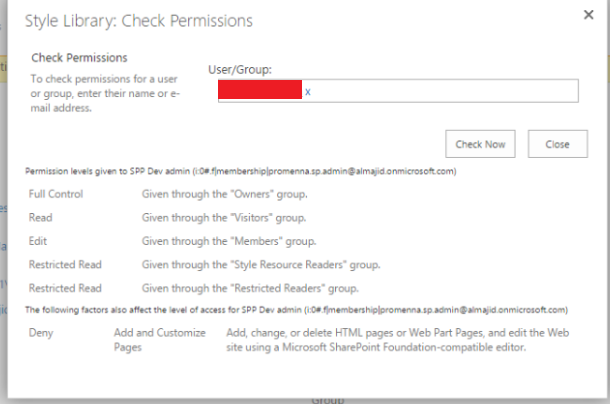
The Deny permission cannot be removed using the standard permission management procedure in SharePoint.
Also, you will find this issue with the root site collection in SharePoint online.
To get rid of the issue, perform the steps outline by Microsoft in the article - Turn scripting capabilities on or off
The scripting needs to be allowed SharePoint Admin Center and if you need it on immediate basis you must use power shell command.
NOTE: If you miss to enable scripting in SharePoint Admin Center, the change performed by the power shell command will be reverted after 24 hours.
Allow Custom Script in SharePoint Admin Center
1. Go to SharePoint Admin Center
2. Select Settings
3. Under Custom Scripts sections, you will see option to Allow / Disallow custom script on persoanl sites and Self-Service sites

4. To get rid of the permission issue permanently, you need to select following options:
- Allow users to run custom script on personal sites
- Allow users to run custom script on self-service created sites
The changes done will require up to 24 hours to get reflected. To make the change immediately you must use the power shell command. Also, as described by Microsoft, change the custom script setting will affect the root site collection. If you need to apply this change to another site collection, you must use the same power shell command to perform the change to different site collection.
Power Shell Command to remove Deny Permission
2. Enter the following line, replace the Site URL with your site collection URL and press enter.
Set-SPOsite "SiteURL" -DenyAddAndCustomizePages 0
Monday, January 9, 2017
The Future of SharePoint
Although posted by Microsoft half a year back but it is worth reading. Most of the things are already rolled out.
The Future of SharePoint - https://blogs.office.com/2016/05/04/the-future-of-sharepoint/
The Future of SharePoint - https://blogs.office.com/2016/05/04/the-future-of-sharepoint/
Tuesday, June 21, 2016
Saturday, May 14, 2016
SharePoint Solution stuck on deploying, retracting and many other related issues
I recently came across very strange and frustrating issue related to timer job. The timer job is responsible for majority of scheduled task within SharePoint. Any solution which is deployed also get scheduled to be deployed across farm with the help of timer job.
The issue started after updating the SharePoint 2010 farm with Service Pack 1. Any deployment or retraction action cannot complete thereafter. If you are deploying a solution the status will forever remain as deploying. Same is the case with retracting and any other timer dependent activity.
I did all troubleshooting as suggested in various forums:
- Cleared SharePoint cache
- Performed all suggestion on these blog posts:
However; the problem still persisted.
Later, I got a solution from MSDN blog by Tehnoon Raza - SharePoint Server 2010: Timer Jobs not Functioning After Applying Updates. I ran the powershell script and all problems were fixed. I have mentioned the powershell script for easy reference:
$farm = Get-SPFarm
$disabledTimers = $farm.TimerService.Instances | where {$_.Status -ne "Online"}
if ($disabledTimers -ne $null)
{
foreach ($timer in $disabledTimers)
{
Write-Host "Timer service instance on server " $timer.Server.Name " is not Online. Current status:" $timer.Status
Write-Host "Attempting to set the status of the service instance to online"
$timer.Status = [Microsoft.SharePoint.Administration.SPObjectStatus]::Online
$timer.Update()
}
}
else
{
Write-Host "All Timer Service Instances in the farm are online! No problems found"
}
Update Claims Provider Trust in ADFS from Metadata file
If you are implementing single sign-on in your SharePoint application or any other web application, then ADFS is the default option as an Identity Provider especially when you are working with Microsoft Products and your application is authenticating from Active Directory.
ADFS can also be configured to authenticate from external provider (we will call it as Claims Provider moving forward) after performing few configuration steps. The steps will involve setting up trust between ADFS and the Claims Provider by binding certificate provided by claims provider in ADFS. We will not be looking into creating new claims provider trust because Microsoft has provided a very nice article for doing so - https://technet.microsoft.com/en-us/library/dn486771(v=ws.11).aspx
Recently I was assigned a task to update the expired Certificate and Federation Metadata for the Claims Provider from metadata file. I didn't find any straight forward article explaining how we can update the existing Claims Provider Trust from a file. Hence wanted to list down the step I followed to update the metadata for existing Claims Provider Trust.
- Add any root certificate you may have received from the Claims Provider to the "Trusted Root Authority"
- Open the Windows Power Shell on ADFS server
- Run the command to add ADFS Powershell Snapin
- Add-PSSnapin Microsoft.Adfs.PowerShell
- Update-AdfsClaimsProviderTrust -TargetName [Name of Claims Provider Trust to update] -MetadataFile [XML file location]
The above step will update the metadata and also the certificate if provided along with Metadata. To check if certificate is present within metadata then search for tag in the metadata file.
Perform the below steps only if you get the following errors at ADFS at the time of login:
- The Federation Service encountered an error while processing the WS-Trust request.Request type: http://schemas.xmlsoap.org/ws/2005/02/trust/RST/Issue
- Encountered error during federation passive request
Set-ADFSClaimsProviderTrust
–TargetName [Name of Claims Provider Trust] –SigningCertificateRevocationCheck “None”
*References
Monday, February 8, 2016
Sharepoint Apps now SharePoint Add-in
Microsoft has renamed the app model in SharePoint and Office to Add-in model. Follow the link for more information:
https://msdn.microsoft.com/EN-US/library/office/fp161507.aspx#bk_newname
https://msdn.microsoft.com/EN-US/library/office/fp161507.aspx#bk_newname
Saturday, January 9, 2016
SharePoint and Yammer - Is it worth for Organizations to go for SharePoint and Yammer together for Enterprise Social
Here are some of the opinions from some of the industry experts on SharePoint and Yammer:
Sunday, November 1, 2015
Transform your SharePoint Customization, Farm solutions into SharePoint App / Add In Model - A great point to start
Here is the great training resource put together by a group of Microsoft Consultants - http://dev.office.com/blogs/transforming-your-sharePoint-customizations
This is a great point to start if you are considering moving into cloud.
This is a great point to start if you are considering moving into cloud.
Sunday, August 30, 2015
Find out what's new in SharePoint 2016
Microsoft has released a public beta of SharePoint 2016. Find out what's new here.
Monday, August 10, 2015
Search Crawl Error - Access is denied. Verify that either the Default Content Access Account has access to this repository, or add a crawl rule to crawl this repository.....
Problem
Cause
The windows update actually enabled the Loopbackcheck leading to crawl failure. The other related problem you will often observe is that you cannot login as another user if you have opened Central Admin on the server itself.
After Windows updates were applied to the SharePoint Server, the search service failed to crawl the content.
Error
"Access is denied. Verify that either the Default Content Access Account has access to this repository, or add a crawl rule to crawl this repository. If the repository being crawled is a SharePoint repository, verify that the account you are using has “Full Read” permissions on the SharePoint Web Application being crawled."
Cause
The windows update actually enabled the Loopbackcheck leading to crawl failure. The other related problem you will often observe is that you cannot login as another user if you have opened Central Admin on the server itself.
Resolution
There are two possible solutions listed at the Microsoft KB article.
Solution 1: Specify host names (Preferred method if NTLM authentication is desired)
Method 2: Disable the loopback check (less-recommended method)
For detail steps follow this link to the KB article.
There are two possible solutions listed at the Microsoft KB article.
Solution 1: Specify host names (Preferred method if NTLM authentication is desired)
Method 2: Disable the loopback check (less-recommended method)
For detail steps follow this link to the KB article.
Sunday, August 9, 2015
Smooth scrolling in IPad and IPhones
Recently, I was working on implementation of SharePoint 2013 public site with responsive behavior using bootstrap.
I was facing unusual issue with scrolling of web pages in IPad and IPhones. The scroll was not smooth enough like it was working in Android devices. One of my good friend who is an expert SharePoint UI developer suggested following one liner CSS fix for this issue.
-webkit-overflow-scrolling: touch;
This worked like a charm.
I am not much familiar with the -webkit. As per this link, it is Open-Source browser Engine used by Safari which is the default browser in all Apple devices.
Saturday, June 14, 2014
Development tools for SharePoint 2013
SharePoint provides whole lot of out-of-box features providing you a platform to deliver your various offerings with little involvement of development team. However; the out-of-box implementation usually needs another layer which contains added feature not provided built-in or enhancement to existing features. To facilitate this, there are tools available by Microsoft and 3rd party as well. We choose between them or in combination based on our customization requirements.
I have attempted to list most commonly used tools with brief description about it:
- SharePoint Designer 2013 - This is a free tool available for download from Microsoft' site. This tool is useful in creating no-code solution. If you are looking for following then this tool is very handy.
- Master Page and Content Page Customization
- Designer Workflows
- BCS
- Basic Web Parts
- List Customization
- Microsoft Visual Studio 2013 - Once Visual Studio has been installed, Office Developer Tools for Visual Studio needs to be installed separately (can be downloaded from the same link as Visual Studio) to develop solutions for SharePoint. Visual Studio is needed when the out-of-the-box solutions are not enough to meet your requirements. Visual Studio allows you to develop following type of SharePoint solutions:
- Developing SharePoint solutions
- Custom Site Columns Definition, Custom Content Types and Custom Lists
- SharePoint Workflows
- Web Parts, Application Pages
- Packaging, Deployment and Debugging
- NAPA - NAPA is web based tool by Microsoft for developing apps for SharePoint Online and Office 365. This tool will allow you to develop using client side model using combination of Javascript, HTML and CSS. Thus using this tool programming is done using Client Side Object Model of SharePoint.
- CAML Designer - When data needs to be fetched from SharePoint based on some filters you use XML based CAML (Collaborative Application Markup Language). CAML is equivalent to the select query in SQL which defines the filters for fetching data. The CAML Designer is very useful in generating queries without having prior knowledge of the CAML schema.
- SharePoint Manager - SharePoint Manager allows you to view and modify the properties of every Site, List and any other entity in a site collection.
- SharePoint LogViewer - This tool is very handy during troubleshooting of issues where you need to go through generated logs to narrow down the root cause of the problem.
- Internet Explorer Toolbar / Chrome Developer Tools / Firefox Developer Tool - These tools work with the rendered HTML content and CSS in browser. These are helpful for analyzing and troubleshooting the HTML layout and CSS issues, debugging of JavaScript, allows you to set breakpoint. The feature provided depends on the tool used.
- InfoPath 2013 - Although, this is not a primary development tool for SharePoint development, InfoPath forms can be used to create electronic forms as an alternative to offline paper forms. It allows rapid development with no programming knowledge needed. However; it does allow coding to create forms with complex logic. SharePoint supports using InfoPath forms as display and edit forms for lists.
Do list your favorite tools in the comments section below.
Friday, October 19, 2012
SharePoint 2010 CSS Reference Chart
Very useful CSS reference chart for SharePoint 2010
http://sharepointexperience.com/csschart/csschart.html
http://sharepointexperience.com/csschart/csschart.html
Friday, September 28, 2012
Getting started with SharePoint Server 2010 for IT pros
Fantastic set of training videos by Microsoft. Very good starting point for beginners in SharePoint.
http://technet.microsoft.com/en-us/sharepoint/ee518660
http://technet.microsoft.com/en-us/sharepoint/ee518660
Wednesday, September 5, 2012
SharePoint 2013 is Coming Up
SharePoint 2013 is coming up soon. Here are the links to the Microsoft Training videos for SharePoint 2013.
Friday, November 4, 2011
SharePoint 2010 Easy Setup Script
The SharePoint 2010 Easy Setup Script will enable you to easily build your developer machine. Here is the link http://www.microsoft.com/download/en/details.aspx?id=23415
Subscribe to:
Posts (Atom)